
Have you ever asked Google something, and it replied that the answer could be found at the Experts-Exchange.com site ? Only after clicking on that link do you realise that the answer can only be viewed after becoming a premium member. If you would like to view the answers from Experts-Exchange without any subscription or login account, read on.
Have you ever wondered why the answer are always available to Google but not to you ? Experts-Exchange seems to give free full access to the answers if they detect Googlebot, or Google’s web crawling robot. They therefore enable Google to index the entire page, as opposed to just indexing the questions.
Another thing that I have always noticed is that, if a Experts-Exchange link is clicked from the Google search results page, I am able to view the answers for a couple of (usually in the range of five to seven) questions. Beyond that, I am forced to subscribe. This means that the Experts-Exchange site looks at the HTTP referrer as well as the cookie information to determine if you are given free access to view the answers.
Now, let’s get started! By the way, this trick only works on Mozilla Firefox.
- Install the User Agent Switcher and RefControl addons and restart Firefox
- From Firefox
Optionswindow, selectShow Cookiesfrom thePrivacytab. Search forexperts-exchange.comand delete all the cookies.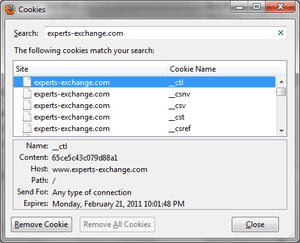
- From the
Optionswindow, selectExceptionsfrom thePrivacytab. Enterexperts-exchange.comand click on theBlockbutton.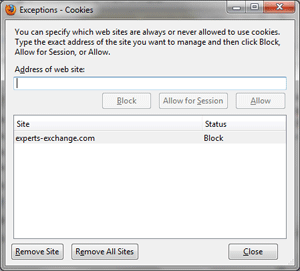
- Click on
RefControl Optionsand setSitetowww.experts-exchange.com. Set theActiontoCustomand set it tohttp://www.google.com/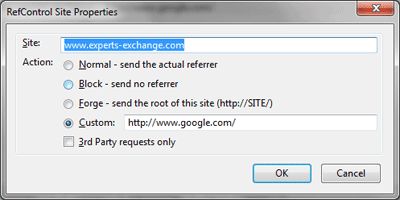
- Access the User Agent Switcher options and select
Googlebot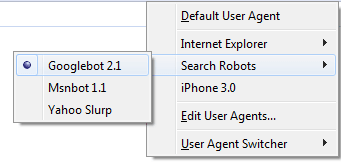
- Now try accessing the Experts-Exchange site. The answers can be found at the bottom of the page!
This trick has been working well for me for a month or so. If it does not work anymore, it means that Experts-Exchange has tweaked or improved their logic.
By the way, if you don’t already know, you can also view the Experts-Exchange answers by clicking on the Google cached view link.

Mohamed Ibrahim

ibrahim = { interested_in(unix, linux, android, open_source, reverse_engineering); coding(c, shell, php, python, java, javascript, nodejs, react); plays_on(xbox, ps4); linux_desktop_user(true); }
