
Google has launched a new Group Chat feature in Google Talk. Even though Google Talk uses the open XML based XMPP protocol for it’s IM service, Pidgin, the open source multi-platform instant messaging client, has yet to support this useful feature.
I have absolutely no clue as to why this feature is not included in Pidgin. I have some of my colleagues on Google Talk and group chat is sometimes a necessary tool to get quick updates from colleagues working from different locations.
As Google Talk is based on a XML protocol, I decided to find out how a group chat is being initiated using Wireshark, a free network protocol analyzer.
Below is a snippet of a group chat request being sent from the official Google Talk client. Note the string: private-chat-11d12d21-46e5-4359-b0cd-44bc01bb82af@groupchat.google.com

The numbers in the string private-chat-11d12d21-46e5-4359-b0cd-44bc01bb82af@groupchat.google.com looks like a UUID number to me. We now have the necessary info to initiate a Google Talk group chat in Pidgin. Click on Join a chat from the Buddies menu in Pidgin. You will get a pop-up window similar to the one below.
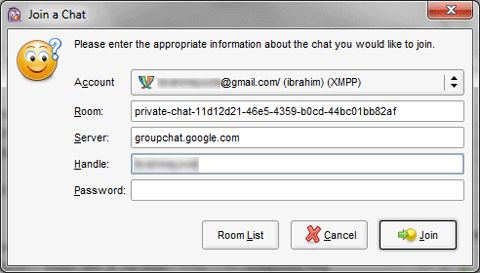
Enter the following fields:
- Room – private-chat-11d12d21-46e5-4359-b0cd-44bc01bb82af
- Server – groupchat.google.com
Join button. You should now have a group chat window opened in Pidgin. You can now start inviting your contacts for a Google Talk group chat on Pidgin.Mohamed Ibrahim

ibrahim = { interested_in(unix, linux, android, open_source, reverse_engineering); coding(c, shell, php, python, java, javascript, nodejs, react); plays_on(xbox, ps4); linux_desktop_user(true); }
