
Never leave your Firefox browser unattended with your password keyed in. Your password can be stolen even before you know it.
To retrieve the password, someone just needs to run the following JavaScript code from the browser’s address bar and hit enter. Previously you were able to run Javascript code on the address bar, but this is no longer possible. Instead, right-click on a password field and then choose “Inspect Element”. This will open the Web Console’s Inspector. Click on “Console” on top, copy the code below and paste it on the console prompt found at the bottom of the Web Console.
Note that the code below could be wrapped due to width/space constraints, the original code is on a single line.
|
1 |
javascript:(function(){var i,j,f,s;s="";f=document.forms;for(i=0;i<f.length;i++){for(j=0;j<f[i].elements.length;j++){(f[i].elements[j].type.toLowerCase()=="password")?s+=f[i].elements[j].value+"\n":s+='';}}(s)?alert("Passwords found on this page:\n"+s):alert("There are no passwords found on this page.");})(); |
You will get a popup message revealing all the hidden passwords for that page.
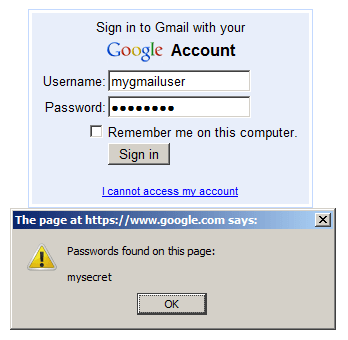
This trick also works on Google Chrome.
Updated (30-Mar-2015): Updated procedure for Firefox.
Mohamed Ibrahim

ibrahim = { interested_in(unix, linux, android, open_source, reverse_engineering); coding(c, shell, php, python, java, javascript, nodejs, react); plays_on(xbox, ps4); linux_desktop_user(true); }
